Model processing is required to produce a live data model from the model definition file. You should enable the Execution Status to show the status for each node in the data flow during model processing.
Show or Hide the Execution Status
By default, when you process the Data Flow, the Execution Status is shown on each of the nodes. You can click Execution Status from the Data Flow ribbon to show or hide the processing status for each node:

Status Indicators on the canvas
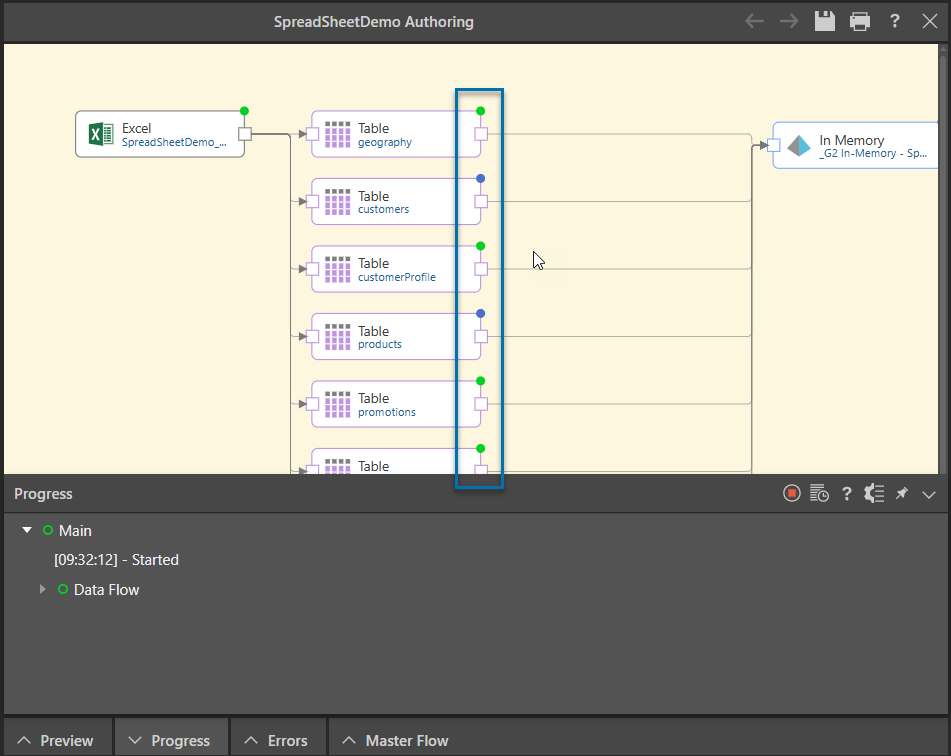
Where the Execution Status button is selected (as shown above), the Execution Status is shown at the top-right of each node on the Data Flow (blue highlight below):
Execution Status Key
Each node displays a color-coded circle denoting its execution status:
- Gray: Not yet processed.
- Blue: Currently processing.
- Green: Successfully processed.
- Red: Failed to process.
Progress Panel
In addition to the Status Indicators, the progress information is also shown in the Progress Panel which pops up at the bottom of the page. The Progress Panel shows the execution status of a model as it is processed. For more information, see Progress Panel.